
Locksmith
After Effects panel (CEP), built for my own timeline
The same handful of moves keeps coming up in my timelines. A card settling into place, a title easing up and holding, a bounce on an icon. Every time, the keyframes lived in one composition and died there. Copy, paste, retime by hand, fix the easing, repeat. So I built the tool I actually wanted. Locksmith is an After Effects panel that turns a selection of keyframes into a reusable, adjustable unit I call a Lock.
What a Lock holds
A Lock captures how the keyframes move, not the layer they're on. Select two or more keyframes on any combination of these properties, hit the header's +, and Locksmith stores the shape of that motion on its own:
- Position: the path the layer travels
- Scale: including independent X/Y when the proportion lock is off
- Rotation: with direction preserved
- Opacity: fades, flickers, holds
- Effects: tracked so Locksmith can add the missing effect before pasting its keyframes
- Expression: carried along when the property is expression-driven
Every Lock in the list shows which of these six it contains, so you can tell at a glance whether "Title Settle" is a full transform-and-fade or just a rotation wobble.
Saving and applying
The workflow is short on purpose. If it isn't, I won't use it mid-edit.
- Select the keyframes on the properties you want to save.
- Click + in the header. Name the Lock, or don't. You can rename it later by double-clicking.
- Select one or more destination layers back in the comp.
- Select the Lock, check the apply options, hit Apply.
Locksmith applies every enabled property to every selected layer at once. "Make these six title cards animate the same way" goes from six manual paste jobs to one click.
The part that took the longest: applying it differently
Saving the keyframes is the easy part. The apply options are why Locksmith exists at all, because the same saved motion almost never fits the new context exactly as recorded.

Timing switches between two ways of changing duration. Stretch nudges the length relative to the original. A 20-frame Lock stretched +50% becomes 30 frames. Retime sets an exact target instead, like 1s flat, no matter how long the original take was.
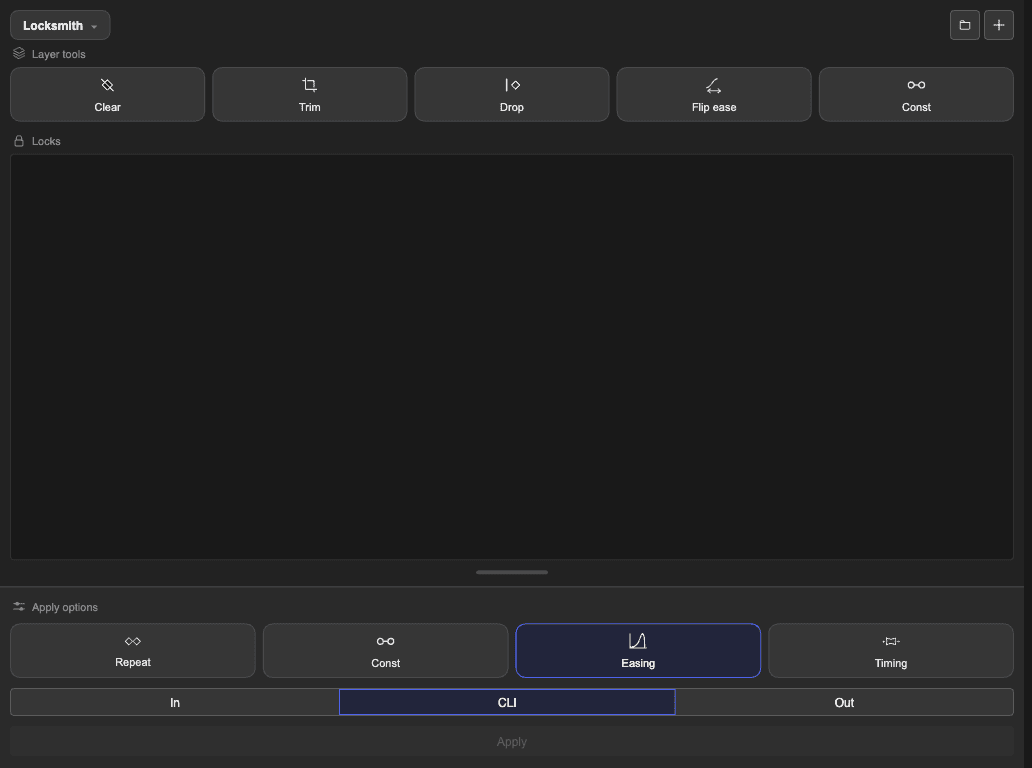
In / CLI / Out decides where the motion anchors on the new layer. It can start at the layer's in-point, sit at the current time indicator, or back off from the out-point. Same Lock, but it's the difference between "this plays as the layer enters" and "this plays as it exits."
Flip and Easing (off, on, reversed) turn one saved motion into two. Same swoop, forward or backward, eased or not, without a second Lock cluttering the list.
Relative is the one I use the most. Each property offsets from wherever that layer already sits, instead of pasting the Lock's absolute values onto it. "Slide in from the left and settle" adapts to whatever "settled" means for that layer, rather than dragging it to the Lock's original coordinates.
Layer tools
Above the Locks list is a row of blunter, one-shot tools for whatever's already on your timeline. No saved Lock required.

- Clear: strips keyframes and expressions off the selected layers.
- Trim: pulls a layer's in/out to its first and last keyframe.
- Drop: deletes any keyframes hanging outside the layer's in/out points.
- Flip ease: mirrors the easing direction on selected keys without moving the values.
- Const: flattens the speed between two selected keys to constant, leaving the easing outside that span alone.
Built to disappear
It lives docked next to the timeline all day, so it follows After Effects' own visual rhythm. A 28 to 32px control height, 11 to 12px type, grayscale everywhere except where color means something, blue for selection, mint for Relative. Dense on purpose. A panel you keep open for eight hours shouldn't ask for more room than it needs.
It ships as a plain CEP extension. Just an index.html, some plain JS driving a small state object, and a .jsx host script that's the only part allowed to touch the After Effects project. No framework, no build step to fight. It opens fast and gets out of the way.
Let's make itBeautiful
